
Build and Deploy a MCP Server to Google Cloud Run for AI-Powered Stock News Access
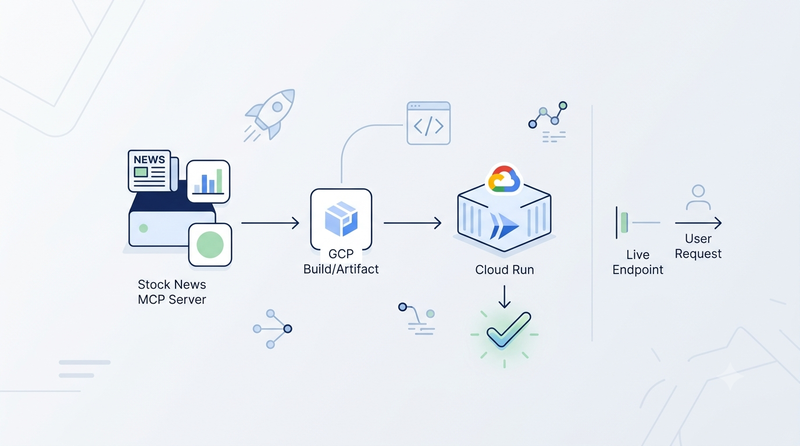
MCP (Model Context Protocol) is quickly becoming the standard way to give AI assistants real-world capabilities by exposing focused, versioned tools that compatible clients such as Claude Code, Codex, and Cursor can call at runtime. In this tutorial, we will build a Stock News MCP Server in Python with FastMCP, containerize it with Docker, deploy it to Google Cloud Run, and connect it to Claude Code so you can fetch live market news with a stock ticker.
What is Google Cloud Run?
Google Cloud Run is a fully managed serverless container platform built on top of Google's Knative infrastructure. You provide a source repository (or a container image), and Cloud Run handles everything else: provisioning, scaling, load balancing, TLS termination, and automatic de-provisioning when there is no traffic.
Key characteristics:
- Scale to zero — when no requests arrive the service scales down to zero instances. You pay only for the CPU and memory consumed during actual request processing.
- Instant scale-out — new container instances spin up within seconds when traffic increases.
- HTTPS by default — every Cloud Run service gets a
*.run.appURL with a Google-managed TLS certificate at no extra cost. - Pay-per-request billing — the free tier covers 2 million requests and 360,000 GB-seconds of memory per month, making it effectively free for low-traffic MCP servers.
- No infrastructure management — no clusters, no nodes, no VMs to patch.
Cloud Run is a natural fit for MCP servers: they need to be reachable 24/7 at a stable HTTPS URL, but traffic is sporadic (an AI assistant calls the tool on demand), so scale-to-zero eliminates wasted cost during idle hours.
Prerequisites
Before you start, make sure you have:
- A Google Cloud account with billing enabled (a billing account is required to use Cloud Run, though the free tier is generous).
- Docker installed on your machine and basic CLI command usage, like
docker build. - Any MCP-compatible client (e.g., Claude Code, Cursor, VS Code, Claude Desktop, Codex CLI) for integration.
- Free API keys from Alpha Vantage and Finnhub as the sources of stock news.
Optionally, it needs to have gcloud CLI installed and authenticated, only if you prefer using CLI to deploy over the Cloud Run console.
MCP Project Overview
An MCP server is a service that exposes tools, data, or functions in a standardized way so AI agents (like Claude or other clients) can call them. It’s used to let AI models securely interact with external systems such as APIs, databases, or custom tools through a consistent interface.
1. What the server does
This project is about a stock news MCP server, and it exposes a single MCP tool:
get_stock_news(query: str) → dictquery can be a ticker symbol (AAPL) or a company name (Apple). The tool fetches articles from two free-tier APIs in parallel, merges and deduplicates them, then returns up to 10 articles sorted by date — each with title, source, published_at, url, summary, sentiment (positive | negative | neutral), ticker, and source_api (alphavantage | finnhub).
Merge strategy: up to 5 articles per source → deduplicate by URL → sort descending by date → return all (max 10).
| API | What it provides | Free-tier limit |
|---|---|---|
| Alpha Vantage | News + sentiment labels | 25 requests / day, 1 req/sec |
| Finnhub | News headlines (no per-article sentiment) | 60 calls / minute |
2. FastMCP in a nutshell
FastMCP is a Python framework that turns ordinary async functions into MCP-compliant tools with a single decorator. The entire server definition in main.py boils down to:
from fastmcp import FastMCP

mcp = FastMCP("stock-news")

@mcp.tool
async def get_stock_news(query: str) -> dict:
    """Get the latest news and sentiment for a stock symbol or company name."""
    ...

if __name__ == "__main__":
    mcp.run(transport="http", host="0.0.0.0", port=8080)
FastMCP handles the MCP wire protocol, tool schema generation, and request routing. A health-check endpoint (GET /health/) is added via @mcp.custom_route so Cloud Run can confirm the container started successfully.
3. Dockerization & Test Locally
The Dockerfile uses a two-stage build to keep the final image small:
# Builder stage — compiles dependencies with uv
FROM python:3.14-slim AS builder
...
COPY --from=ghcr.io/astral-sh/uv:latest /uv /usr/local/bin/uv
COPY pyproject.toml uv.lock* README.md ./
RUN uv sync --frozen --no-dev --no-cache

# Runtime stage — lean image with only what's needed to run
FROM python:3.14-slim AS runtime
...
COPY --from=builder /app/.venv /app/.venv
COPY main.py ./
COPY news/ ./news/

ENV PORT=8080
CMD ["python", "main.py"]
The builder stage installs all Python dependencies inside a virtual environment using uv. The runtime stage copies only that virtualenv and the application source, leaving build tools behind. The result is a compact, production-ready container.
Before the production deployment, let's confirm everything works correctly on the local machine within docker container.
$ docker build -t stock-news-mcp-server .Run the MCP server with Docker container:
$ docker run -it --rm \
  -p 8080:8080 \
  --env ALPHAVANTAGE_API_KEY=<api-key1> \
  --env FINNHUB_API_KEY=<api-key2> \
  stock-news-mcp-serverFINNHUB_API_KEY=<ap-key2>  \
  stock-news-mcp-server
INFO     Starting MCP server 'stock-news' with transport 'http' on http://0.0.0.0:8080/mcp                                                                                     transport.py:304
INFO:     Started server process [1]
INFO:     Waiting for application startup.
INFO:     Application startup complete.
INFO:     Uvicorn running on http://0.0.0.0:8080 (Press CTRL+C to quit)
The server starts on http://0.0.0.0:8080. In another terminal, confirm the health endpoint responds:
$ curl http://localhost:8080/health/
{"status":"ok"}
Deploy to Google Cloud Run
There are two ways to deploy: through the Google Cloud Console (covered below with screenshots) or via the gcloud CLI (shown at the end of this section). In the following sections, we will explain the deployment process step-by-step with the console.
1. Enable Billing
Open the Google Cloud Console, navigate to Cloud Run, and create or select a project. If you haven't linked a billing account you'll see:
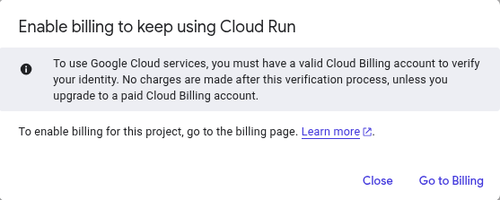
Click Go to Billing and follow the prompts to attach a billing account. Cloud Run's free tier means typical MCP server workloads incur no charges, but a billing account is required to activate the service.
Here's info about services with request-based billing during billed instance time
Free tier (based on us-central1 active pricing):
- CPU - First 180,000 vCPU-seconds free per month
- RAM - First 360,000 GiB-seconds free per month
- Requests - 2 million requests free per month
For more details about Cloud Run pricing, please look into https://cloud.google.com/run/pricing
Deploying to Cloud Run requires enabling billing, and usage may incur charges if you exceed the free tier limits for requests or compute resources.
2. Create a New Cloud Run Service
In the Cloud Run console, click Connect repository (under "Deploy a web service") to set up continuous deployment from GitHub.
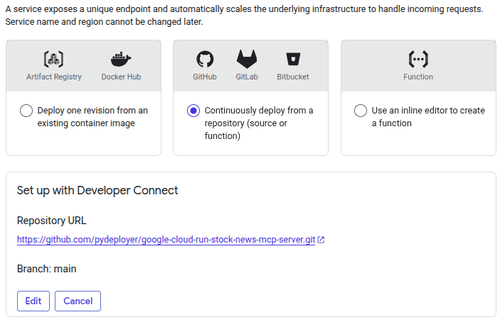
Select Continuously deploy from a repository (source or function) and click Set up with Developer Connect. Authenticate with GitHub, then select your forked repository (your-username/google-cloud-run-stock-news-mcp-server) and the main branch. Cloud Run will create a Cloud Build trigger that automatically rebuilds and redeploys whenever you push to main.
On the following Configure section, set:
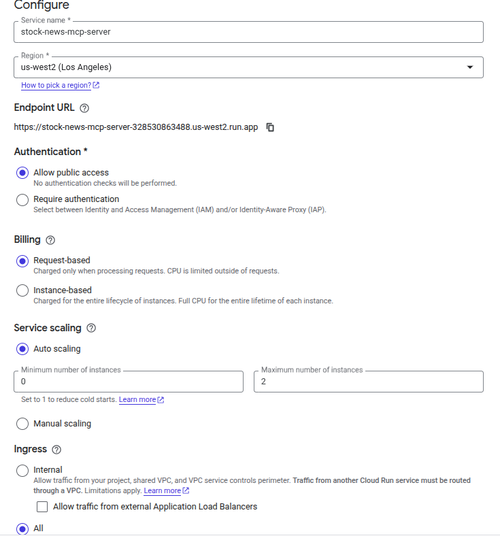
Something to highlight:
- Service name:
stock-news-mcp-server— Becomes part of your Cloud Run endpoint URL. - Region:
us-west2(or the region closest to your users) — Cannot be changed after the service is created. - Authentication: Allow public access — Allows MCP clients to connect without Google Cloud credentials.
- Billing: Request-based — You pay only when the service receives requests.
- Minimum instances:
0— Scales to zero when idle to minimize costs. - Maximum instances:
2— Limits the number of running instances to help control costs. - Ingress: All — Allows requests from the public internet.
3. Configure the Container
On the following Containers, Networks & Security section:
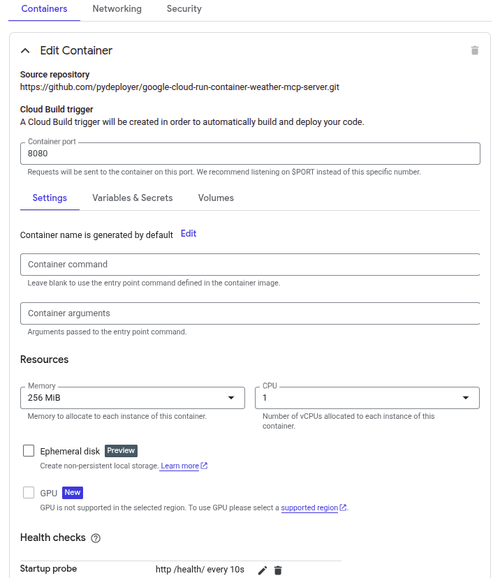
Settings to highlight as well:
- Container port:
8080 - Memory:
256 MiB - CPU:
1 vCPU - Startup probe: HTTP
GET /health/every10seconds
The startup probe points to the /health/ endpoint defined in main.py. Cloud Run will wait for this probe to succeed before routing traffic to the instance, preventing cold-start errors from reaching clients.
Under the Variables & Secrets tab, add the two required environment variables for the data source API keys -
For production use, store secrets in Google Secret Manager and reference them as secrets in Cloud Run rather than plain environment variables.
Click Create. Cloud Run will trigger a Cloud Build, push the image to Artifact Registry, and deploy the first revision. The process typically takes 2–3 minutes.
Once complete, your service URL will look like: https://stock-news-mcp-server-328530863488.us-west2.run.app. We can use curl to check the health status of this MCP server.
$ curl https://stock-news-mcp-server-328530863488.us-west2.run.app/health/
{"status":"ok"}
4. Alternative: Deploy via CLI
If you prefer the command line, a single command covers the full build-and-deploy cycle:
$ gcloud run deploy stock-news-mcp-server \
  --source . \
  --region us-west2 \
  --set-env-vars ALPHAVANTAGE_API_KEY=<api_key1>,FINNHUB_API_KEY=<api_key2> \
  --allow-unauthenticated \
  --port 8080
--source . tells the gcloud CLI to upload the source directory, build the Docker image using Cloud Build, push it to Artifact Registry, and deploy — all in one step.
Services behind the Deployment
Behind a Cloud Run deployment, Google Cloud provisions and uses several managed services automatically. The primary services include:
- Cloud Run – Hosts and runs your containerized application.
- Artifact Registry – Stores the Docker image that Cloud Run deploys.
- Cloud Build – Builds the Docker image from your source code or GitHub repository.
- Developer Connect – Connects your GitHub repository to Google Cloud for continuous deployment.
- Cloud Logging – Collects application and request logs.
- Cloud Monitoring – Provides metrics, health monitoring, and alerts.
- IAM (Identity and Access Management) – Controls permissions for deploying and invoking the service.
- Cloud Load Balancing (managed by Google) – Routes incoming HTTPS traffic to your Cloud Run service and handles TLS termination.
Depending on your application, you may also use additional services such as Secret Manager for API keys, Cloud Scheduler for scheduled jobs, Pub/Sub for event-driven messaging, or a VPC Connector to access private resources.
Query with Claude Code
In this section, we'll use Claude Code as client to consume this MCP server. You're free to use any other MCP-compatible client or AI agent, such as Cursor, Visual Studio Code with GitHub Copilot, Claude Desktop, OpenAI Codex CLI, or any custom client that supports the MCP. The setup steps are similar regardless of the client you choose.
1. Register the MCP Server
With the server deployed and verified, we can integrate it to Claude Code. Run the following CLI command to register the MCP server on your machine,
$ claude mcp add stock-news \
  --transport http \
  https://stock-news-mcp-server-328530863488.us-west2.run.app/mcp
Alternatively, in your project directory, open or create .claude/settings.json at the project-level, and add:
{
  "mcpServers": {
    "stock-news": {
      "type": "http",
      "url": "https://stock-news-mcp-server-328530863488.us-west2.run.app/mcp"
    }
  }
}Make sure to replace the URL with your own Cloud Run service URL.
2. Query Stock News
Once registered, Claude Code can call get_stock_news from any conversation. Try:
$ claude mcp add stock-news \
  --transport http \
  https://stock-news-mcp-server-328530863488.us-west2.run.app/mcp
Restart Claude Code (or reload the MCP config with /mcp) to activate the server.
> What's the latest news for stock AMZN?

● Calling stock-news… (ctrl+o to expand)
  ⎿  "AMZN"

--------
 Tool use

   stock-news - get_stock_news(query: "AMZN") (MCP)
   Get the latest news and sentiment for a stock symbol or company name.

 Do you want to proceed?
 ❯ 1. Yes
   2. Yes, and don't ask again for stock-news - get_stock_news commands in ~/Workspace/pydeployer-examples/google-cloud-run-stock-news-mcp-server
   3. No

 Esc to cancel · Tab to amend

● Here's the latest news for AMZN (Amazon):

  ---
  1. Amazon stock beats Nasdaq before holiday break positive
  TechStock² — Jul 3, 2026
  Amazon closed up 0.4% vs. Nasdaq's 0.8% loss ahead of Independence Day. Key focus next week: Prime Day sales data and the Leo satellite project, now with 394 satellites in orbit nearing initial service.
  Analysts hold a strong buy consensus.

  ---
  2. Amazon Now leads on raw delivery speed neutral
  Yahoo (Finnhub) — Jul 4, 2026
  Morgan Stanley analysis finds Walmart has the strongest overall fulfillment model, but Amazon Now leads on raw delivery speed. Delivery speed is emerging as a key differentiator as AI-powered shopping
  assistants grow.

  ---
  3. Amazon is finally taking the fight to Starlink neutral
  Yahoo (Finnhub) — Jul 3, 2026
  Deep-dive on Amazon's Project Kuiper satellite internet service as it ramps up to challenge SpaceX's Starlink dominance.

...
You can also use company names:
> Any news about Amazon today?Claude will resolve Amazon to AMZN via the Alpha Vantage symbol-search endpoint before fetching news.
Yeah! Our stock news MCP server production endpoint works as expected.
Pros and Cons
1. Pros
Google Cloud Run
- Scale to zero eliminates idle costs entirely — perfect for MCP servers with sporadic traffic patterns.
- Fully managed — no Kubernetes clusters, no VM patching, no load balancer configuration.
- Built-in HTTPS with automatically renewed TLS certificates on
*.run.appdomains. - Continuous deployment from GitHub via Developer Connect makes iterating frictionless.
- Generous free tier — 2 million requests and 360,000 GB-seconds of memory per month at no cost.
FastMCP
- Minimal boilerplate: a decorator and a docstring are all that's needed to define a tool.
- Handles the full MCP wire protocol, including schema generation and transport negotiation.
- Supports both streamable HTTP and SSE transports with a single config change.
2. Cons
Google Cloud Run
- Cold starts — when a service scales from zero there is a latency spike (typically 1–3 seconds for this Python image) before the first request is handled. Setting minimum instances to 1 eliminates cold starts but removes the scale-to-zero benefit.
- Ephemeral instances — no local disk persistence across requests; caching requires an external store (Redis, Firestore).
- Networking — accessing private resources (databases, internal APIs) requires VPC connector configuration.
Free tier Data Sources
- Alpha Vantage allows only 25 requests per day, with a hard rate limit of 1 request per second. Company-name queries consume 2 calls (symbol search + news fetch). Heavy usage will exhaust the daily quota quickly.
- Per-article sentiment is not available on the free plan; all Finnhub articles default to
neutral, reducing the usefulness of the sentiment field for Finnhub results.
Summary & Source Code
In this tutorial you built a production-ready Stock News MCP Server with Python and FastMCP, packaged it in a lean two-stage Docker image, and deployed it to Google Cloud Run with a few clicks in the console. The Cloud Run service automatically builds from your GitHub repository, handles TLS, and scales to zero when idle — making it a cost-effective host for any MCP server.
You then verified the deployment with MCP Inspector, confirming the get_stock_news tool responds correctly before wiring it into Claude Code. With the server registered, any Claude Code conversation can call get_stock_news on demand to pull live, sentiment-annotated market news from Alpha Vantage and Finnhub.
The same pattern — FastMCP tool + Docker + Cloud Run + Claude Code integration — applies to any real-world data source you want to expose to an AI assistant: weather APIs, internal databases, document stores, or custom analytics pipelines. Cloud Run's serverless model and MCP's open protocol make it straightforward to compose multiple focused servers into a rich AI toolset without managing any infrastructure.
Next steps:
- Store
ALPHAVANTAGE_API_KEYandFINNHUB_API_KEYin Google Secret Manager and reference them from Cloud Run for improved security. - Add a Redis cache layer (via Cloud Memorystore) to reduce API calls on repeated queries for the same ticker.
- Set up Cloud Monitoring alerts on the Cloud Run service to get notified if error rates or latency spikes exceed thresholds.
- Upgrade to a paid plan to remove the free-tier daily cap and unlock per-article sentiment from the data sources.
Based on the pros and cons, we can know that Google Cloud Run is ideal for deploying containerized, stateless applications that experience sporadic or unpredictable traffic. Common use cases include REST APIs, microservices, AI inference services, MCP servers, webhooks, and event-driven applications. Its automatic scaling, including scale-to-zero, makes it particularly cost-effective for workloads that aren't continuously running. However, applications that require persistent local storage, long-running background processes, or consistently low-latency responses without cold starts may be better suited to other deployment platforms.
The source code lives at https://github.com/pydeployer/google-cloud-run-stock-news-mcp-server. If any issue or question, please free feel to reach out.